
All Activity
- Today
-

Build does not work right when trying to replicate 99-title DVD
dbminter replied to Johnny Shanley Productions's topic in ImgBurn Support
Well, that VIDEO_TS may be 16 GB, but it's not a DVD Video compliant VIDEO_TS. My bigger concern is why ImgBurn thinks that fits on a DVD+R DL? 16 GB is like twice that size! I am only guessing this is an error in the software and it's incorrectly assuming by finding a VIDEO_TS folder that it should fit on a DVD+R DL. Wait, none that screenshot makes sense! How can 17 billion bytes fit into an image size of 7 billion? Are you simply just copying the VIDEO_TS from the Disney DVD physical disc itself into ImgBurn? If so, that definitely won't be a playable DVD Video ISO. -

Build does not work right when trying to replicate 99-title DVD
Johnny Shanley Productions replied to Johnny Shanley Productions's topic in ImgBurn Support
BTW This is what i mean 16.3GB Video TS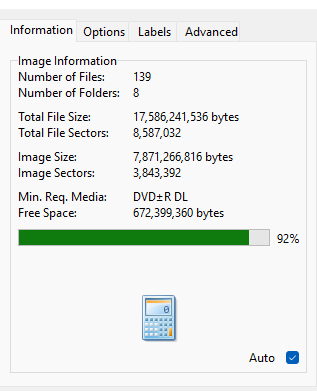
-
Build does not work right when trying to replicate 99-title DVD
Johnny Shanley Productions replied to Johnny Shanley Productions's topic in ImgBurn Support
Here's a little update: I actually fixed it: All I had to do is use PowerISO to fix the directory. Also I mean HDD because I was editing a DVD I ripped to there and then I make edits to it -
Build does not work right when trying to replicate 99-title DVD
dbminter replied to Johnny Shanley Productions's topic in ImgBurn Support
What do you mean by a 16.3 GB VIDEO_TS? That's definitely way too much for a DVD Video on a DVD-9. If you've got a 16 GB VIDEO_TS after decrypting one of those ARCOSS discs, then compressing it down to 8.5 GB will almost always never work. Then, you mention HDD and SDD with 99 titles. An HDD is a Hard Disk Drive, which is a PC storage device. And I don't know what an SDD is. -
Build does not work right when trying to replicate 99-title DVD
Johnny Shanley Productions posted a topic in ImgBurn Support
Ugh, Here I am again. For some reason, whenever I try to make a 16.3GB VIDEO_TS into a 8.5GB ISO, it doesn't work right. If I have "Preserve Full Path Names" checked, it can save the contents space but it sets the contents type to "Data" instead of "DVD-Video", but if I don't, it doesn't save space and gives me a warning and sets it to Blu-Ray type instead of "DVD-Video". This is very weird, because I have an ISO of Baby Neptune 2009, and it is bigger than 8.5GB in total, and it does play as a DVD-Video ISO. However, the ISO I am making does not play right for some reason when tested in VLC. I do have the "Optimise Duplicate Files" option checked, but it doesn't work for DVD-Video. Also the layer-break pop up does not show for some reason. BTW, yes I am trying to replicate the 99-title protection seen on Disney DVDs from late-2008 until mid-2012 on my ISO. Would it be possible to make a version of ImgBurn that can build a DVD-ISO with duplicate/fake titles from an HDD/SDD/that has 99-titles? - Yesterday
-
 VojtaNN joined the community
 - Last week
-
 jeetbuzz088 joined the community
 -
No, a burn cannot be resumed once stopped. Your disc was a BD-R, so it can't be reused, unlike a BD-RE. So, just trash it.
-
Please forgive me if this is something obvious, I looked and didn't find anything and I'm a complete novice when it comes to burning discs. Last night I was running a burn while I slept and woke up to discover it got interrupted partway through thanks to my computer having dismounted every connected USB device; this is not an unusual problem for me, everything just gets spontaneously disconnected and promptly reconnects, real obnoxious in the moment but doesn't cause any real problems. ImgBurn gave me the option to resume, but it couldn't see the drive anymore. My computer had successfully reconnected it but ImgBurn didn't see it, so I figured I just have to close and reopen the program for it to find it again, which it did, but at that point anything relating to that last burn operation was gone. Now I have a disc with an incomplete burn, the ISO file, and ImgBurn which knows the burn was incomplete. Attached is the log from the second time I opened the program, since I didn't think to save it the first time, and the results of the verification operation on the incomplete disc. Is there a way I can continue it from where it stopped? What happens if I start burning the ISO again? The disc cannot be erased; is it lost? Any advice helps. Thanks. ImgBurn.log
-
 0VERXHEAVEN joined the community
 - Earlier
-
 RaymondLuxuryYacht joined the community
 -
on the BD-R verbatim disc quality issues..
dbminter replied to ultramegaburningenthiseist's topic in Chat
I would highly recommend you perform a Verify test on at least a few of those CMC discs burned a year ago. Anything with CMC in its Disc ID generally raises red flags for low quality media. -

on the BD-R verbatim disc quality issues..
Kabombon replied to ultramegaburningenthiseist's topic in Chat
This is quite unfortunate. I have yet to see a DOA (Dead on Arrival) batch myself. I bought 4 spindles of 25 containing MediaRange BD-R SL (CMCMAG-BA5-000) discs, and none of them had any issues upfront, I could burn and properly verify them. Have yet to see if the data on them is still properly readable or not after an year of being stored away but I have high hopes. -
Do yall know of any burners that are able to burn triple/double layer blu rays correctly?
Kabombon replied to ultramegaburningenthiseist's topic in Chat
Hello! Saw triple layer Blu-ray discs mentioned in this topic and hopped right in! 😁 I've started a research on these last year and the information I provided in that topic might help you to have as little issues with burning/reading that kind of Blu-ray discs as possible. (because knowing how to properly burn these discs is unfortunately quite important, learned on MakeMKV's forum while studying about disc drive firmwares) Check it out here: MediaRange BD-R XL (VERBAT-IMk-000) -
Hello! Been some time since I've wrote on ImgBurn's forum. Seen this post here and came up with a few possibilities. First, according to my knowledge discs are made to support a certain reading speed: X1, X2, X4 and so on. Each one of them being a certain data-rate value: -on DVD 1X equals (1385000 bytes per second) -on CD 1X equals (153600 bytes per second) (DVD being a bit over 9 times greater) what causes this difference is pitch density and rotations per minute. Once the driver identifies what kind of disc it's reading, it should set limits in rotations per minute according to their rated standard, which is set as default in the driver's firmware. (the rated standard is usually stamped on the disc itself, but the user can modify the reading/writting speed on PC through software) Now here's where issues arise. Not all discs are born equal, same goes for every single piece of hardware coming out of the factories. 12 centimeter discs are made to keep their form as much as possible at a rated rpm (rotations per minute), if the disc is by any chance faulty from factory, degraded by time/environment or usage, it will warp enough for data to be unreadable at it's rated reading speed or even crack/break apart due to centrifugal force inside the drive. This standard of disc format we are using today is rated to "stay in one piece" at up to ~23.000 rpm, but once a disc gets anywhere near that, it will warp enough to be unusable even if it does not break apart right then and there. I believe your issue deserves to be studied more, and maybe test it out with a CD, DVD or even a miniDVD if you have any at hand. (although a miniDVD will resist better at a higher rpm than 12 centimeter disc due to it's reduced mass)
-
Be aware that ASUS has apparently changed the entire firmware architecture of currently shipping models of this drive. They appear to have started all over with 1.01 and they've repeated the same mistakes of the past. Like the first instance of this drive I first tested before, the 1.01 firmware version destroyed BD-RE discs. They are completely unreadable after writes and cannot be reformatted in an LG WH16NS60.
-
OIC. You were making a comparison because both drives broke discs. Well, I don't think it's because they're similar hardware. Why would ASUS and LG share hardware with each other? I have seen Verbatim drives that were actually Pioneers, but I don't think there's an equation there.
-
I was just pointing out the similar hardware, which is probably the reason why they are able to "break" discs.
-
I still don't see why you'd want to cross flash the "perfectly" working NS60 to the ASUS firmware that only ever worked with 3.11.
-
http://wiki.redump.org/index.php?title=Flashing_Custom_JB8_Firmware You cross-flash it into a LG JB8 model and then cross-flash it again into the BW-16D1HT.
-
I've not heard the two drives are compatible. Particularly considering ALL of the firmware except 3.11 for the BW-16D1HT has been problematic and the WH16NS60 has been (relatively) bork free firmware wise.
-
It's basically the same drive, right? I think the WH16NS60 can be crossflashed to the BW-16D1HT.
-
Mine occurred in an LG WH16NS60.
-
Something similar happened to me last year. I was trying to read a disc using an Asus BW-16D1HT but I was getting some errors, so I tried opening and closing the tray every time the drive got stuck reading it. I did that about 5 or 6 times, when I took the disc out the last time, it was cracked from the center to almost the edge. I had no idea Bluray discs were so fragile or that the drive could damage a disc like that and I've been burning/reading discs probably as long as you have.
-
In the entire 26 years I've been burning optical discs, I've NEVER had happen what happened last night! It started earlier in the day when I inserted a BD-RE into my drive and it made a loud grinding noise trying to read it. The drive never did anything else out of the ordinary until a few hours later. I was reading some data from a BD-R I had just burned to verify the contents when it suddenly made an even louder grinding noise than before and stopped reading the disc. I discovered what had happened: the BD-R had broken up into 3 separate pieces INSIDE the drive! Needless to say, I replaced the drive in question with one in reserve and I've had nothing untoward since.
-
Any updates on this issue?
-
AFAIK CloneCD and Alcohol are the only programs that could burn images that required specific subchannel data in RAW mode. There's still interest in burning these types of discs (as you can see here: https://github.com/Kippykip/SBITools). I know it's a long shot, considering Imgburn development seems halted for over a decade, but I would like to leave the suggestion here in case there's a change of heart 😅
-

Pioneer BDR-S13U-X (fw 1.03) Randomly Hangs PC When Burning Discs
LIGHTNING UK! replied to pendell's topic in ImgBurn Support
Right click on the drive selection box and select ‘family tree’. Let us know what it says please. -
Pioneer BDR-S13U-X (fw 1.03) Randomly Hangs PC When Burning Discs
dbminter replied to pendell's topic in ImgBurn Support
Most unlikely a BIOS issue. One thing that might help is to change the I/O Driver in the ImgBurn Settings. Try changing to a different I/O and see if the issue goes away. If it doesn't, try changing to a different option and repeat.

