
All Activity
- Past hour
-
I'm glad it was an easy fix! I have seen cases in my own experience before where a spindle was fine part of the way through but bad in the rest. I can see it happening. A spindle might use up the last few discs from one batch, which was good, but the next batch pressed might be bad. So, the remaining discs added to that cake stack could theoretically be bad.
- Today
-
I grabbed a BD-DL disc from a different spindle and it burned fine -- clearly just an issue with the discs themselves. I've just never experienced half a stack being bad as opposed to the whole thing, but I guess that's what happened here. Thank you for your help!
-
 andoid2278 joined the community
 - Yesterday
-
If these discs worked before in this drive before and if you got discs in this current stack to work but now they're not, the issue is probably 1 of 2 things: 1.) you got a bad batch of discs part way through your current stack 2.) your drive most likely needs replacing I would be more willing to bet on #2 versus #1. The cheapest solution is probably to get another stack and see if they work any better. I've never used BD-R DL before. Only BD-RE DL. The Verbatim BD-R DL I were using weren't that great over 10 years ago. I'd write to them for yearly backups and then write a year later and they wouldn't complete writes for a 2nd time. So, I really can't recommend any BD-R DL. I've got bookmarked some Verbatim DataLife Plus BD-R DL as Verbatim DataLife BD-R SL are the only ones I trust now.
-
I've used both of these drives for years without issue, as well as many other discs from this particular stack. I just am surprised that some discs at the top of the spindle I bought worked fine whereas others in the same set suddenly have issues. I guess the warping in the photo leaves no other explanation though. I saw your 2025 post about Verbatim being low-quality now; what a shame. The spindle I'm currently trying to use is from 2024, I think -- don't think they were DataLife. What brand do you suggest instead?
-
I saw a USB BD burner recently that also said it was 2.x. I'd always heard you needed USB 3.x to properly use them, but that may not be the case. It was my only suggestion other than this. I wouldn't invest in another batch of BD-R DL thinking you had a bad batch unless you have successfully burned these BD-R DL before in this drive. And even if they have, Verbatim made a running change in their branded BD-R SL that make them junk now. I can't say for sure, but that may have happened with the BD-R DL. Are your Verbatim BD-R DL the DataLife Plus variety? If they are, they should be good. I plan on testing some of those for the first time next month.
-
Thanks for the suggestion. However, the drive itself (BRXL-PC6U2) is an external with built-in 2.0 cables. My other external (BRXL-PTGU2V) also comes with 2.0 attached. The ports on my desktop are 3.0.
-
I've not used that drive before or any BD-R DL discs, but I did notice something that might be worth trying. I see the device is listed as USB 2.0, but that may be a cosmetic bug in ImgBurn listing USB 3.x as 2.0. Blu-Ray burners need USB 3.x connection speeds to operate at optimum capacity. If you know the device is connected to a USB 2.x port or using a USB 2.x cable, try using a USB 3.x cable on a USB 3.x port and see if that helps.
-
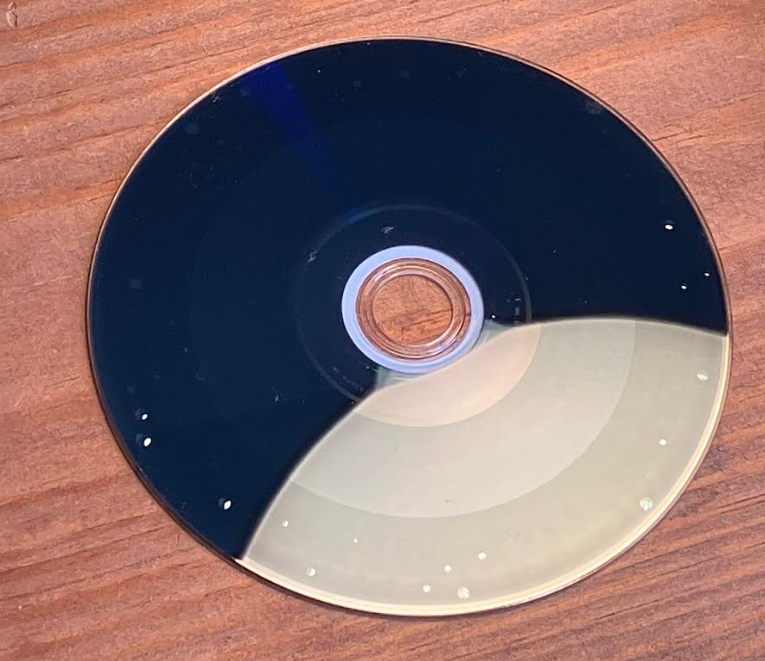
Hello, I have a stack of Verbatim BD-R DLs which I bought a couple years ago and have used on and off since then, without any issues. However, beginning a couple weeks ago, any attempts to burn to these discs leads to an error like the following: This always happens when it is beginning to write to the second layer. I have used two separate drives and the errors occur on both. Afterwards when I turn the failed disc over, I see small bubbles have appeared where it has attempted to write to the second layer: The obvious conclusion would be that the discs are bad, but I have not heard of the first dozen discs in a stack being fine and the others being unusable. I've also never seen this "bubble" issue before. Before I spend another $100 on new double-layer Blu-rays I'd like to know if bad discs definitely are the culprit, and it is not something wrong with the way my computer is trying to author the disc. Thank you.
-
 Jeee joined the community
 -
 Gardenerr joined the community
 - Last week
-
 SMARTBOYYYY joined the community
 -
The Buffalo MediaStation BR-XL 16U3 Version 1.3.0 is a USB 3.0 external Blu-Ray XL burner with an LG BH16NS58 drive inside it. The installed firmware version is 1.03 and appears to be the latest one available. It passed all tests I threw at it except for the one fatal deal killer. So, I'll only list the drawbacks. Wrote 8x to Verbatim DataLife Plus Mistubishi MKM 8x DVD+R DL. HOWEVER, it did NOT do it for very long! The Average Write rate was only 4.4x! No bombing out at the layer change on Write or Verify, though! The deal killer is writing to CD's; it basically doesn't! If the image size is under 100 MB, writing is fine. I tried an 800 MB CD Audio image and it NEVER wrote to ANY CD-R or CD-RW due to a semaphore timeout has expired issue. This was on Verbatim DataLife Plus CD-R that were big enough to hold the image and several 24x Memorex CD-RW. A 500 MB test I attempted to write failed to complete due to an invalid write address error. And those burns that did start and complete only wrote to 16x on 24x rated CD-RW media. Bottom line is, PASS on this drive unless you NEVER intend to write to CD's. Now, my unit was sold Used - Like New. I am in the process of getting a New unit and see if that improves the CD writing capability. However, I hold out little hope. The CD issue is most likely a bad firmware one and, thus, present in ALL units of this model.
-

Build does not work right when trying to replicate 99-title DVD
Johnny Shanley Productions replied to Johnny Shanley Productions's topic in ImgBurn Support
Ah ok -

Build does not work right when trying to replicate 99-title DVD
LIGHTNING UK! replied to Johnny Shanley Productions's topic in ImgBurn Support
So it needs ‘optimise duplicate files’ enabled to make it smaller but when it’s detected as a dvd video structure, it turns that off due to ifo and bup files intentionally being duplicates. There’s no way around that as the program is working as per design. The design just doesn’t work for structures like that. -
I got it the first time! Because I am new to some of this, I was seriously confused about what to put in the second session! I put a .jpg in there and ImgBurn rightfully complained about not being able to find a combination of filters for the file So, this is a sort of chicken and egg thing. You need the LBA offset in order to correctly build the .iso, and you need the .cue file made with the iso to get the LBA offset. A dummy .iso will probably work and now that I think I have a handle on all this, I am going to step through this again with a dummy iso. Edit: Yep. I use a small .iso file I copy to my project directory. Use that to build the right .cue file the first time. Copy-and-overwrite.iso Get that offset, then build the intended .iso and overwrite the "copy-and-overwrite.iso" file. Switch to write mode, pick that .cue file and you are off to the races with a good disc!
-
Build does not work right when trying to replicate 99-title DVD
Johnny Shanley Productions replied to Johnny Shanley Productions's topic in ImgBurn Support
it is -

Build does not work right when trying to replicate 99-title DVD
dbminter replied to Johnny Shanley Productions's topic in ImgBurn Support
99 Titles is the maximum # for DVD Video compliance. So, it's not that the DVD has 99 Titles that is the problem. It's the 17 GB VIDEO_TS. And whatever home made protection you're trying to add to it. While that ISO may work in VLC, I would highly doubt burning it to a DVD+R DL will produce a disc playable on DVD player hardware connected to a TV. This disc you burned may play on a PC, but I've no idea from the screenshot if that's a PC playing it or not. -
Build does not work right when trying to replicate 99-title DVD
Johnny Shanley Productions replied to Johnny Shanley Productions's topic in ImgBurn Support
The ISO i am making also has a layer-break as well. I wonder if It's possible to edit the layer-break in ImgBurn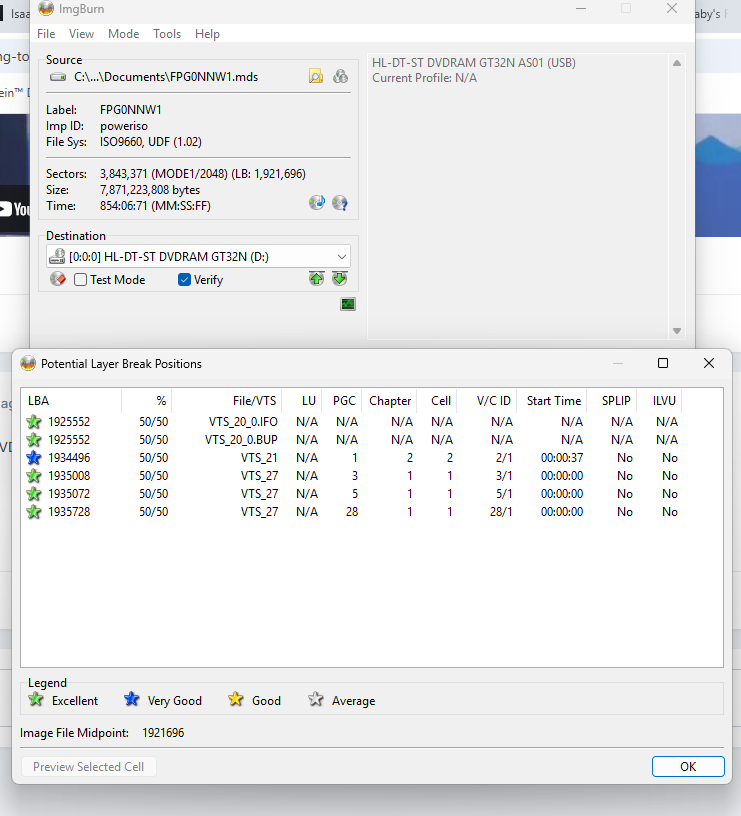
-
Build does not work right when trying to replicate 99-title DVD
Johnny Shanley Productions replied to Johnny Shanley Productions's topic in ImgBurn Support
And yes, this DVD does have the 99-title protection -
Build does not work right when trying to replicate 99-title DVD
Johnny Shanley Productions replied to Johnny Shanley Productions's topic in ImgBurn Support
Actually, someone did manage to copy a DVD that has 99-titles (their ISO, as well as the one I have are from a Private Google Drive) and their copy works fine, the ISO even does say it has 6.41GB, when it's actually 13GB. So it's definitely possible to detect the fake/duplicate files and still be able to burn them onto a blank disc; here's proof BTW (this is a burned disc): -
I am glad you made this. I just spent a good chunk of time trying to sort all this out. Was at the point of wanting to find a disc and see what magic was used to make it. And then I read this! I will report back after my first try. Oh, use case. Well, I want to supply a couple audio files with a children's book. The book is one of those play the record and follow along kinds many of us had as kids. There is something about the classic styles that continues to appeal. Few people have record players, so I thought I would make an audio CD and include files for portable media players. This mode of disc building should work just fine. We will see .... [ greets from Oregon, USA ]
-
Build does not work right when trying to replicate 99-title DVD
dbminter replied to Johnny Shanley Productions's topic in ImgBurn Support
Well, it's definitely not DVD Video compliant at 17 GB. -
Build does not work right when trying to replicate 99-title DVD
Johnny Shanley Productions replied to Johnny Shanley Productions's topic in ImgBurn Support
And I did test the ISO after editing with PowerISO, it works fine, at least on VLC, I can also mount it too -
 SpudDK joined the community
 -
Build does not work right when trying to replicate 99-title DVD
Johnny Shanley Productions replied to Johnny Shanley Productions's topic in ImgBurn Support
Actually, it's a Fanmade DVD I made myself LMAO -
Build does not work right when trying to replicate 99-title DVD
dbminter replied to Johnny Shanley Productions's topic in ImgBurn Support
Well, that VIDEO_TS may be 16 GB, but it's not a DVD Video compliant VIDEO_TS. My bigger concern is why ImgBurn thinks that fits on a DVD+R DL? 16 GB is like twice that size! I am only guessing this is an error in the software and it's incorrectly assuming by finding a VIDEO_TS folder that it should fit on a DVD+R DL. Wait, none that screenshot makes sense! How can 17 billion bytes fit into an image size of 7 billion? Are you simply just copying the VIDEO_TS from the Disney DVD physical disc itself into ImgBurn? If so, that definitely won't be a playable DVD Video ISO. -
Build does not work right when trying to replicate 99-title DVD
Johnny Shanley Productions replied to Johnny Shanley Productions's topic in ImgBurn Support
BTW This is what i mean 16.3GB Video TS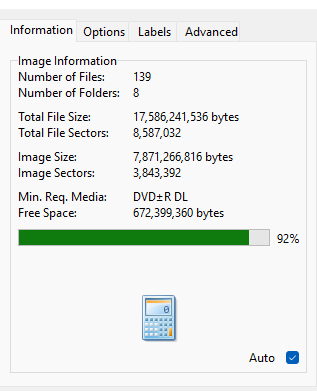
-
Build does not work right when trying to replicate 99-title DVD
Johnny Shanley Productions replied to Johnny Shanley Productions's topic in ImgBurn Support
Here's a little update: I actually fixed it: All I had to do is use PowerISO to fix the directory. Also I mean HDD because I was editing a DVD I ripped to there and then I make edits to it -
Build does not work right when trying to replicate 99-title DVD
dbminter replied to Johnny Shanley Productions's topic in ImgBurn Support
What do you mean by a 16.3 GB VIDEO_TS? That's definitely way too much for a DVD Video on a DVD-9. If you've got a 16 GB VIDEO_TS after decrypting one of those ARCOSS discs, then compressing it down to 8.5 GB will almost always never work. Then, you mention HDD and SDD with 99 titles. An HDD is a Hard Disk Drive, which is a PC storage device. And I don't know what an SDD is.