All Activity
- Today
-
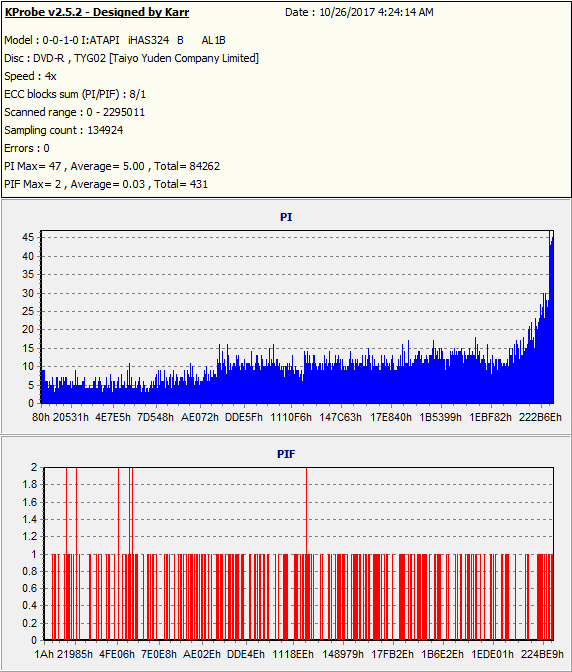
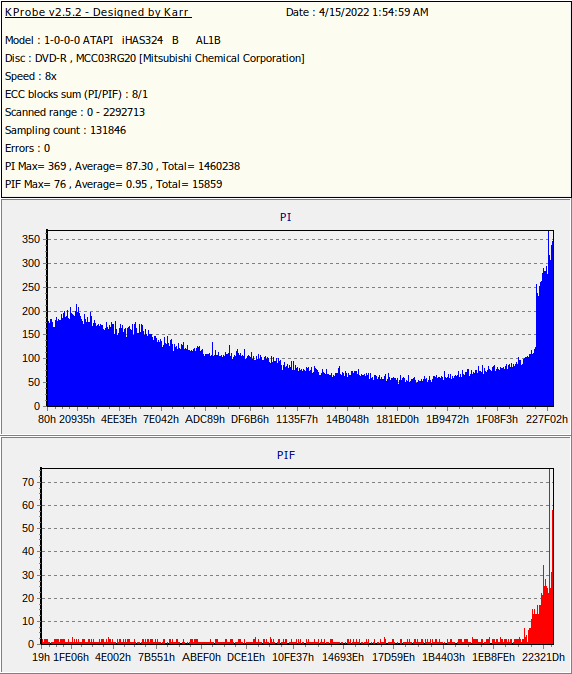
It was not 'lower quality' but outright read failure (i.e. I can't even copy the data from disc back to hard drive for general use), which is why I posted it. the general point of those two KPobe scans were to give people around here a rough estimate as to the difference of 'quality' (and thereabouts) vs 'outright failure' (or thereabouts). I just can't say at which point is specific failure, but given that scan it's probably the '76' red spike. if not just that, then the rest are around 25-30 or so tops and even if that technically does read it, I would not be feeling good on that one at all. but in regards to those TYG02 are discs I bought a long time ago (likely when I got my first DVD burner which means 2005 at the oldest. but probably there or maybe a year or two after when I got the TYG02 discs, so call it about 2005-2007) as I still have a large portion of those un-burned (since at this point I pretty much use them for limited higher importance data backup). the MCC on the other hand, were bought back in I think 2022 (as I mentioned I only burned a small amount before returning them as basically defective) and pretty much all others of similar type (DVD-R or +R of same MCC Verbatim variations) I had in the past, of which I still have plenty of those, still burn well (or not too far from those standards) the last I checked as on the 100-pack shows a date of Jan 2014. so I suspect quality of discs has varied, or maybe I got a bad batch(?), or maybe they tweaked the dye a bit since and my burners don't particularly like the newer ones(?). but burn the ones I have from Jan 2014 quite well the last I checked and I had the same DVD burners for quite sometime... Liteon 1673S from 2005, Sony Optiarc 7240s from I think 2009, and most recently Liteon iHAS-324B from I think 2011. in fact, taking a quick look through some of my older scans of MMC, which are the 'older' stuff I bought probably over a decade ago now, show quality scans of say 'MCC004' (i.e. Verbatim DVD+R 16x rated) with PIE max of 19, so quite good here, and on the PIF's, which are more important, are 2 MAX and a grand total of only 639 PIF's total on the entire disc as that scan was Oct 2017. I also saw Verbatim DVD-R with a media code of MCC03RG20 and that was scanned April 2022 (disc originally burned Sep 2010 which means it had to be either burned on my Liteon 1673S or Sony Optiarc 7240s) with a max PIE peak of 38, so not 'perfect' but not far from it, and more importantly the PIF's are very low as while it had a peak of '3' single spike (damn near all of the rest were '1' lacking a small amount of '2'), the total disc was only 239 total, so pretty great here. I even have some 'old' stock I bought on Ebay roughly a handful of years ago (I would have to check to say for sure but this is likely close) that are the older Verbatim DVD+R 8x 'MCC_003' and the burn quality of those varies, but is generally anywhere from okay-ish (some I might be a bit concerned with) but most are good and some in that great range as in that 10 or so PIE ball park etc. or another way to put it... out of the nearly 50 scanned 'MCC_003' discs only about 5 or so tops I might have some level of concern with burn quality (but even these, assuming they hold at their current rate and don't degrade much as time passes, could easily still be readable a long time from now). so about 10%. but even these, using that disc scan above that I already posted as a rough estimate of actual disc read failure, pretty much all or maybe all besides about one of them, look 'good enough' one could say, which takes that 10% back to about 2%. but the 0-10 stuff in blue you mentioned (and assuming low PIF's etc like I was roughly saying)... that's more of that nit-picking 'best of the best' quality range, which I generally don't worry about too much since the first scan I posted is far closer to 'perfect' than 'failure'. but I have seen some scans in that 10-ish range though on other sites over the years, which are great, but like I say, I don't even worry about getting close to that range in general since it's pretty much overkill burn quality. so in short, besides that bad batch from 2022 I sent back, overall I am anywhere from good enough to great-ish burn quality.
-
Based on this guide, it says that the best possible burns have C1 errors (for CDs) or PIEs (for DVDs) that are between 0 and 10. Your TYG02 burn seems to be close within this range to the point where it would classify as a good quality burn. Your MCC DVD burn on the other hand is on the lower quality side, as you pointed out with the higher PIEs being the "blue" stuff. Usually MCC is supposed to be better than the results you achieved. Maybe the specific drive you used preferred Taiyo Yuden over the verbatim media?
- Earlier
-
You basically need a burner that can do decent scans with stuff like KProbe to give you a pretty good ball park figure on overall burn quality. for example here is a scan of a random disc I had (see attached picture which is quality media (Taiyo Yuden DVD-R 8x (TYG02))). as that was a disc I scanned pretty much 10 years after initial burn and it still looks good. the 'blue' is generally not as important as the 'red' ones. but from what I heard over the years anything around a single 3 spike or so or less is considered pretty great burn quality and you can see here that nothing is higher than 2. even the 'blue' stuff in my scan here is pretty strong overall. I forgot the exact spec on the blue ones but I want to say up-to about 280 (the lower the better) would be within spec. a while ago I got some DVD discs which did not like my burners (I returned the discs shortly after burning a small amount) and those I was getting actual disc read failure as I kept the disc scan to give me a rough reference point of when the scan becomes so bad it actually causes the burner to fail to read the data, which is the case on this scan with the high red colored spike. you can even see the 'blue' stuff looks so-so at best. these basically give you a pretty good ball park figure on a quality burn and one that had actual read failure after burning. but I do have some others that are sort of suspect at times even though they still technically work and are readable with no obvious problems. like one I am looking at a moment ago shows peak PI (blue color) of 674, which I am not happy with, but the PIF (red color) topped out at 9 spike (which is still much better than the scan with KProbe I posted here where I had actual read failure with a 76 spike with a fair amount in the 10-20+ range) but vast majority of the entire scan was 4-6 max. so basically if the disc has no read issues early on in the read, it's probably safe at the end the day. but all of the DVD's I still have unburned will generally be in the ball park of the 'good' scan here (maybe some outliers that are still within half-decent burn quality range here and there though) since that batch I got where you see the bad scan here I returned and what was messed up is the one that was bad (like actual disc read failure) was normally quality discs as you can see from media code (Verbatim MCC etc). p.s. but with that said, even without doing a KProbe disc quality scan, just copying data from the disc back to hard drive through file manager (or similar to what you did in your scan in the first post of this topic) might give you some rough indication (not as accurate as the KProbe stuff though) of whether the disc is currently so-so or not as if it slows during reading of the disc that 'may' indicate potential issues even though it still technically works. but even here, if the disc does not degrade much in 10-20 years, it might hold at it's current rate a long time. so ultimately you will have no real problems with the disc. I just prefer to have a good initial burn quality because I theorize 'if' the burned disc degrade at a slow and fairly consistent rate it will buy you that much more time before the disc fails to read in a random DVD reader/burner vs one that might already be so-so right from the start.
-
There's a first time or everything and this one message I've never encountered before. My setup is as follows: main PC is Win10 pro, network server is Ubuntu 20 with a bunch of attached PCs, android phones and tablets, and a Unifi network. In the process of simultaneously backing up two separate home network folders onto BD-R DLs using two LG WH16NS40 drives this message popped up during verification. At the same time. I figured the network dropped off somehow and sure enough, Windows Explorer had lost connection. I use Webmin for server management and reconnected immediately but ImbGurn failed to resume verification after repeatedly clicking the Retry button. Explorer also reconnected. Strangely no log for the session in question for the entire day. The most recent log was from 2025-11-22, last Saturday. I will verify the backups against ISOs but my main question is why didn't ImgBurn resume verification? If the network did indeed drop - and I'm not sure it actually did drop - shouldn't ImgBurn rseume the job? Or am I missing something? BD-R DLs are sensitive things. I use them quite a bit and a loss of 10% is not unusual but a bad disc will usually show up during the write portion. If it's during the verify it'll be a obvious read error. This error wasn't the data or the disc, it was about a broken transfer from data to disc. The LS40s don't have a great reputation but mine have lasted 5+ years under production level use, reading/writing several times per day. I'd appreciate some advice on this, especially on a method of checking ImgBurn's connection to the network without interrupting the job at hand. Verifying against an ISO is OK but it's after the fact. It would also be great to verify a disc against files, not just an ISO.
-
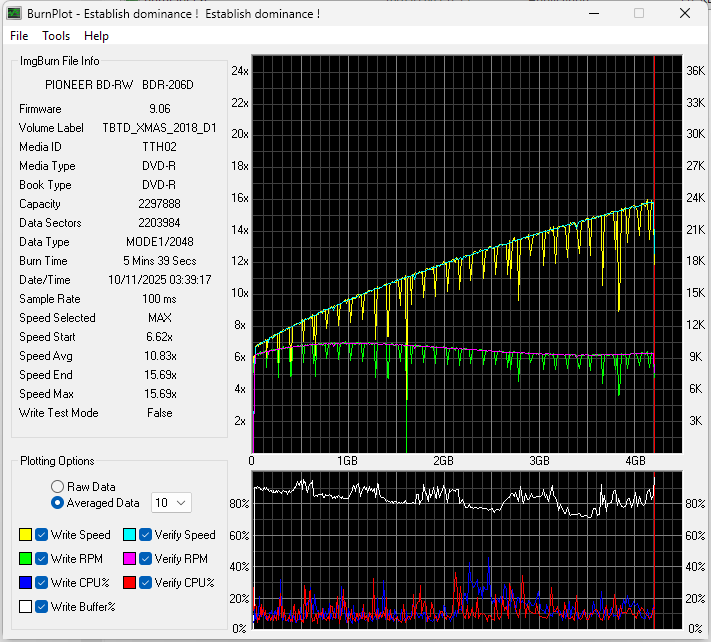
It looks good to me. No weird drops in drive speed and a smooth curve so yes, it looks good for now. We could get a better idea of the quality of a burn with a scan of the disc using either DVDInfoPro, nero disc speed, or KProbe with a LiteOn drive. Feel free to provide a scan if you can, and we can check it out.
-

Disc says it burned successfully, but when reinserted, it's blank again
BE.6.7.10 replied to BE.6.7.10's topic in ImgBurn Support
Doesn't help. But i did find another DVD drive and got the drivers installed. So i'll try that and see how it goes -

Disc says it burned successfully, but when reinserted, it's blank again
dbminter replied to BE.6.7.10's topic in ImgBurn Support
Did you try changing the I/O Interface? See if that helps. Tools --> Settings --> I/O --> Page 1 --> Interface. Try selecting a new one and closing and reopening ImgBurn each time after the Interface is changed to see if that helps. -
Disc says it burned successfully, but when reinserted, it's blank again
BE.6.7.10 replied to BE.6.7.10's topic in ImgBurn Support
So my other computer is gone now. I tried again today. The issue is still there. It's most likely a drive problem -
Just fitted replacement equipment in my Bravo SE as it wasn't working before, just checking if you think this graph is okay for a DVD burn at 16x and verify (via USB 2). Thanks
-

IMGBurn stopped working with my Primera Bravo SE
BlizzardUK replied to BlizzardUK's topic in ImgBurn Support
Thanks. This is very odd but my SE is modified by myself to record blu-rays, it was working great for a long time, then the above mentioned problem happened. So I ordered up a new £6 USB to SATA kit, exactly the same as my old one that I bought, but new. Inside the SE is a USB socket, so instead of using a IDE to SATA bridge I bypass the IDE and connect a SATA kit up to the USB socket inside. As I say, worked fine for a long time. The new kit seems to have fixed the problem, just tested it now with 3 discs, it wouldn't even get past the initial stage before, now burns right through. I guess I should really test each item out one by one to see what it was at fault. Everything was plugged in, so it wasn't like it was loose. Now I have said all this it will probably stop working again. -

IMGBurn stopped working with my Primera Bravo SE
LIGHTNING UK! replied to BlizzardUK's topic in ImgBurn Support
USB issues? Device disconnecting? Check Eventviewer for system errors. Look for the device vanishing from Device Manager. Try another usb port and/or cable. -
This is not unique to IMGBurn, when I use the PTPublisher software that comes with the machine as soon as a disc is inserted and tried to write to, in that software it also comes up with an error saying it suddenly can't find the robot. In IMGBurn it pops up a error message, it says the below as soon as it tries to write to a disc. What might be going on here ? What is likely at fault ? It was working fine last week, I don't think I made any changes myself, unless a Windows update did something. I can still use IMGBurn to eject the disc, so it is still making communication. I 05:59:35 ImgBurn Version 2.5.8.0 started! I 05:59:35 Microsoft Windows 8 Professional x64 Edition (6.2, Build 9200) I 05:59:35 Total Physical Memory: 67,023,860 KiB - Available: 31,387,532 KiB I 05:59:35 Initialising PTRobot... I 05:59:35 PT_SDK Version 1.6.2.0 I 05:59:35 Initialising SPTI... I 05:59:35 Searching for Auto Loader devices... I 05:59:37 -> Auto Loader 1 - Info: Disc Publisher SE 1.24 08/05/2008 I 05:59:37 Found 1 Auto Loader! I 05:59:37 Searching for SCSI / ATAPI devices... I 05:59:37 -> Drive 1 - Info: PIONEER BD-RW BDR-X12 1.03-ID56 (K:) (USB 2.0) I 05:59:37 -> Drive 2 - Info: PIONEER BD-RW BDR-206D 9.06-ID75 (J:) (USB 2.0) I 05:59:37 Found 1 BD-RE and 1 BD-RE XL! E 06:00:44 CreateFile Failed! - Device: '\\?\usbstor#cdrom&ven_pioneer&prod_bd-rw___bdr-206d&rev_9.06#09ad00083851&0#{53f56308-b6bf-11d0-94f2-00a0c91efb8b}' E 06:00:44 Reason: The system cannot find the file specified. E 06:00:48 CreateFile Failed! - Device: '\\?\usbstor#cdrom&ven_pioneer&prod_bd-rw___bdr-206d&rev_9.06#09ad00083851&0#{53f56308-b6bf-11d0-94f2-00a0c91efb8b}' E 06:00:48 Reason: The system cannot find the file specified. I 06:01:15 Close Request Acknowledged I 06:01:15 Closing Down... I 06:01:15 Shutting down SPTI... I 06:01:15 ImgBurn closed!
-
Disc says it burned successfully, but when reinserted, it's blank again
BE.6.7.10 replied to BE.6.7.10's topic in ImgBurn Support
I think it is a drive issue. I actually created an ISO on ImgBurn and then transfered it to my other computer and it worked fine -
Disc says it burned successfully, but when reinserted, it's blank again
LIGHTNING UK! replied to BE.6.7.10's topic in ImgBurn Support
This looks like a drive issue. If you’d left Verify enabled, it would have picked up on the fact the drive went through all the motions of burning the disc but didn’t actually burn anything. can you see any sort of ring on the disc that might indicate it at least attempted to? -
Disc says it burned successfully, but when reinserted, it's blank again
dbminter replied to BE.6.7.10's topic in ImgBurn Support
DVD Video not playing on a DVD player is not necessarily the same as no data being on the disc. DVD Video not playing on insertion into a standalone DVD player could be other issues. Also check in File Explorer for any contents that were written to the disc. -
Disc says it burned successfully, but when reinserted, it's blank again
BE.6.7.10 replied to BE.6.7.10's topic in ImgBurn Support
I already tested it on my DVD Player. No it does not work. And yay, I already reached the maximum amount of posts I can make today -
Disc says it burned successfully, but when reinserted, it's blank again
dbminter replied to BE.6.7.10's topic in ImgBurn Support
As I said, first isolate if anything was actually written to the disc. Try accessing its contents in File Explorer or playing it in a standalone DVD player. If File Explorer shows contents and/or a standalone DVD player does play it but ImgBurn says the disc is still empty, you probably need to change your I/O driver in ImgBurn. First, check to make sure of the first part I mentioned earlier and then we'll proceed from there if ImgBurn is actually writing contents to the discs and just needs an I/O interface change. -
Disc says it burned successfully, but when reinserted, it's blank again
BE.6.7.10 replied to BE.6.7.10's topic in ImgBurn Support
It still happens, even though I tried different input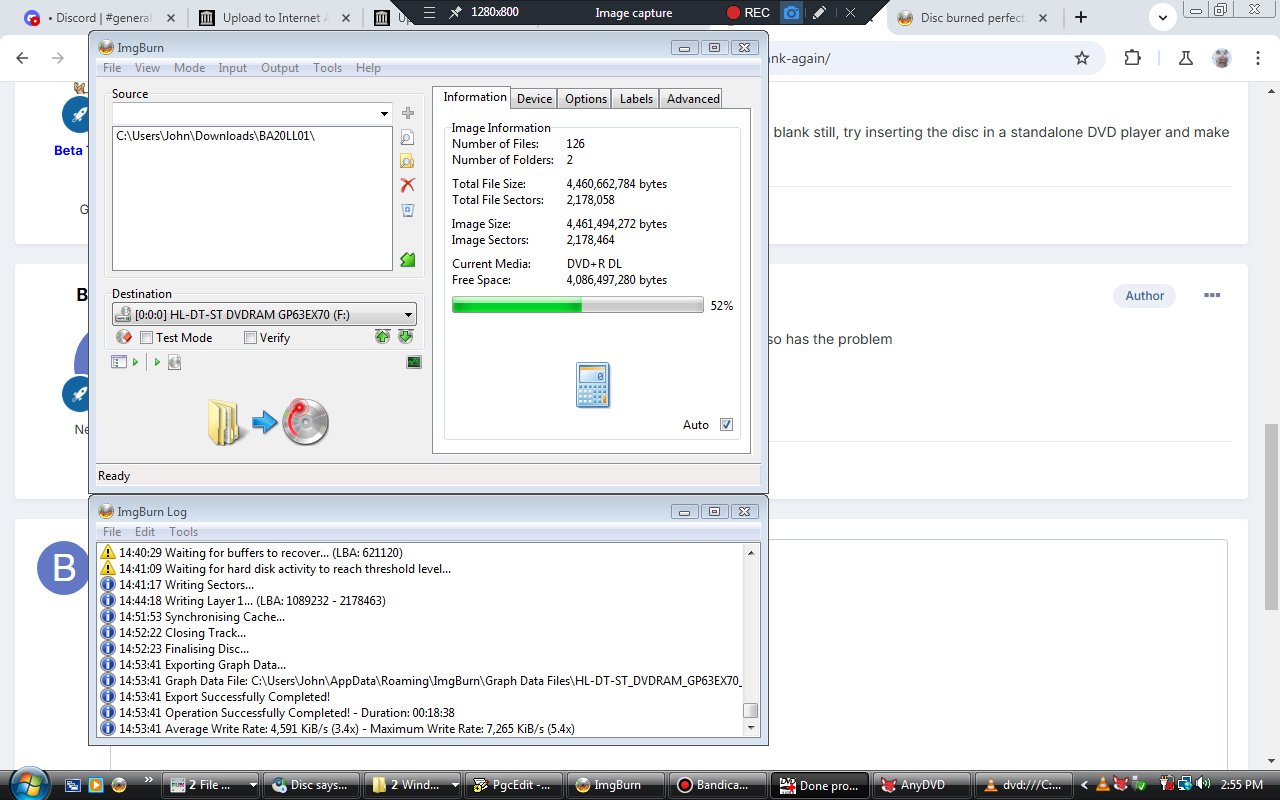
-
Disc says it burned successfully, but when reinserted, it's blank again
BE.6.7.10 replied to BE.6.7.10's topic in ImgBurn Support
I actually never had it set to test mode. I'm currently trying another ISO to see if it also has the problem -
Disc says it burned successfully, but when reinserted, it's blank again
dbminter replied to BE.6.7.10's topic in ImgBurn Support
Just to make sure, are you certain you didn't do a Test mode burn? Otherwise, when this happens, check the contents in File Explorer. If it shows up as blank still, try inserting the disc in a standalone DVD player and make sure it does in fact play. -
Disc says it burned successfully, but when reinserted, it's blank again
BE.6.7.10 replied to BE.6.7.10's topic in ImgBurn Support
And yes, before you ask, it is Dual-Layer media. And it's a DVD+R DL (not RW). I have no idea on how this even is happening -
Disc says it burned successfully, but when reinserted, it's blank again
BE.6.7.10 posted a topic in ImgBurn Support
For some reason, sometimes whenever I finish a burn, it fake completes, as when I reinserted the exact disc in my Laptop, it shows as blank again. How do I fix this? -
Good day folks, in a roundabout way of creating direct BitChannel control, I am seeking to get ahold of the “red book” EFM (eight to fourteen modulation) codex. My project relies upon creating a consistent pattern of pits and lands on a CD-R. The purpose of this is to create a disc which has a pattern that resonates with a specific energy quality. I have actually acquired gold plated CD-Rs from MaM-A for this project too. It’s a bit “esoteric” in nature. ( all good and friendly intentions of course. For EMF protection tools actually. Happy to expand on this if anyone’s curious.) As a relative novice in the field of optical discs, I have come to the idea that using specific hex code inputs to create a repeating pit and land structure is the simplest way to achieve my goals. However I’ve had a little trouble locating the 256 bit encryption key with which to select my inputs. Basically im creating a file on Powershell which then creates a .bin incorporating my chosen input pattern, and then using IMG burn to apply it to the discs. if anyone can help me get to the next step here that would be excellent. And im also looking to get on the phone with someone who’s more knowledgeable and have a chat about this topic. And to get a better comprehension of the technology as a whole. Willing to pay a reasonable consultation fee to anyone qualified who takes me up on this. Im of course open to other suggestions as well, as I may be missing another better approach. Thanks for reading! feel free to email me if you’d like to have a paid consultation gig; aeth_art@proton.me
-
Build mode Destination previous file output name not remembered
dbminter replied to dbminter's topic in ImgBurn Support
Ah, never mind. I forgot about ImgBurn.ibb again. I just recalled it and it wasn't in my INSTALL.TXT notes, but it is now! -
Build mode Destination previous file output name not remembered
dbminter posted a topic in ImgBurn Support
I'm having to reinstall everything on my PC and I've got an issue with ImgBurn. I imported all of my saved settings from a REG file, but Build mode did not auto populate my old previously existing Destination file location and name. So, I created a new image file in Build mode with the desired folder location and file name. However, upon closing and opening ImgBurn again, the application now wants me to enter the file name and location on each Build operation. This had never happened to me before in at least 10 years. Importing the .REG file always seemed to work. And shouldn't changing the Destination path and name have been repopulated on next open of ImgBurn? Is there a setting I missed before? Thanks!